How it works

Follow one job from first enquiry to follow-up.

The Command Center keeps the customer, scope and next action together. Here is how a job moves through the workspace.

One job, from lead to follow-up

Follow Birch Gate Studio’s entrance inspection in Tamarack’s Command Center. The customer details in this example are fictional.

Step 1 of 4 · Lead

Save the original request

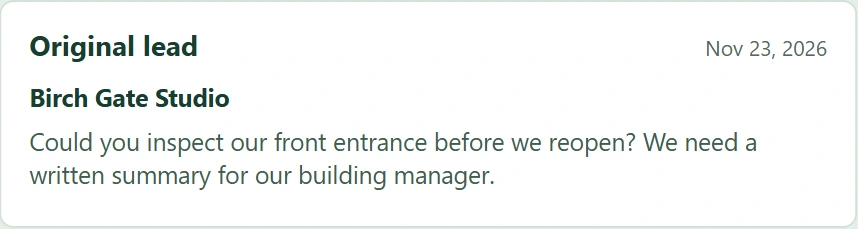
Birch Gate Studio is reopening. They ask Tamarack to inspect the front entrance and send a written summary to their building manager. The request stays on Birch Gate’s customer record.

Birch Gate Studio’s original request for an entrance inspection and a written summary.
Tamarack Field Services · Example workspace
Open full-size lead screen

Step 2 of 4 · Quote

Keep the price with the promise

Tamarack quotes $285 CAD for the inspection, photos and a written summary. Birch Gate accepts version one. The team can reopen the exact scope their customer approved.

Accepted quote, revision one. Entrance inspection and written summary, $285 CAD.
Tamarack Field Services · Example workspace
Open full-size quote screen

Step 3 of 4 · Job

Give the work an owner and a date

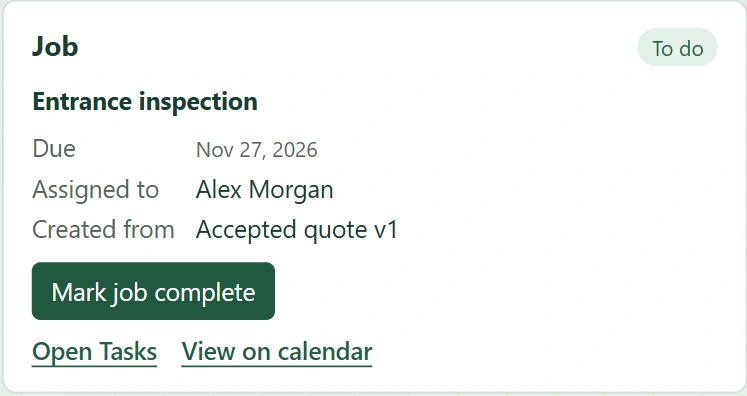
Alex Morgan gets the inspection, due November 27. The job links back to the accepted quote, so Alex can check what was promised before going on site.

Entrance inspection assigned to Alex Morgan, due November 27, from accepted quote revision one.
Tamarack Field Services · Example workspace
Open full-size job screen

Step 4 of 4 · Follow-up

See what you still owe the customer

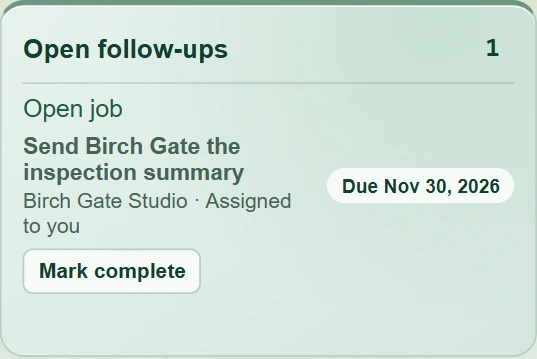
The inspection is complete. Sending Birch Gate the summary is still on Alex’s dashboard, due November 30. Alex can mark it complete after it’s sent.

See the full dashboardThe Tamarack demo workspace with the lead-to-job dashboard and the open Birch Gate follow-up.
Open follow-ups shows the Birch Gate inspection summary assigned to you, due November 30.
Tamarack Field Services · Example workspace
Open full-size follow-up screen
Discuss this workflow

Compare Command Center packages

Create Free Command Center now. Paid plans are coming soon. Monthly prices are in Canadian dollars, before tax, for one business with one user included.

Free

$0 / month

Keep track of new enquiries and the next person to call.

1 user included
Manual workspace · no external connections
Basic Caitlin briefing
Create Free Command Center

Native tools & Caitlin

A personal dashboard, manual leads, contacts and tasks. A basic Caitlin briefing helps you find the next follow-up.

Caitlin usage target: 5 uses per business each month.

Connections

Free is a manual workspace. Paid plans introduce connections to outside accounts.

AI agents

Caitlin is built in. Specialist agents start with paid plans.

Automations

A simple follow-up rule turns a new enquiry into a reminder.

Planning allowance: 1 active rule and 10 completed runs per month.

Team pricing

One person. Choose a paid plan when you need to invite staff.

Lite

$24.99 / month

Take an enquiry through a quote, a job and a follow-up.

1 user included
3 shared connections
Caitlin included
Ask about Lite

Native tools & Caitlin

Inbox, leads and customers, quotes, projects and jobs, tasks, calendar and files. Basic expenses, social drafts and reporting round out the workspace. Lite is designed for self-service setup at $0.

Caitlin usage target: 25 uses per business each month.

Connections

Choose up to three supported business accounts. A suggested set pairs email and calendar with accounting and social publishing. A combined mail and calendar account uses one slot.

AI agents

Eligible Email, Website or Messenger agents are planned as optional paid add-ons. The base subscription includes Caitlin.

Automations

One-step workflows such as a reminder after a quote is sent or a check-in task after a completed job.

Planning allowance: 2 active rules and 50 completed runs per month.

Team pricing

Seats 2–3: $10 each. Seats 4–5: $8 each. Seats 6 onward: $6 each per month.

Standard

$49.99 / month

See where enquiries come from and coordinate team follow-up.

1 user included
5 shared connections
1 eligible specialist agent
Ask about Standard

Native tools & Caitlin

Everything in Lite, plus team views, enquiry sources, quote reporting and organic marketing insights. Website and search reporting are planned with Analytics and Search Console.

Caitlin usage target: 60 uses per business each month.

Connections

Five flexible slots. Connect daily business accounts and add tools for capturing or tracking enquiries. Standard’s planned website and search reporting is a separate plan inclusion.

AI agents

Choose one eligible specialist when released. Planned monthly target: 100 specialist actions shared by the business.

Automations

Multi-step follow-up and draft review. A form submission can create a lead, assign an owner and schedule the next action.

Planning allowance: 5 active rules and 150 completed runs per month.

Team pricing

Seats 2–3: $15 each. Seats 4–5: $12 each. Seats 6 onward: $9 each per month.

Plus

$99.99 / month

Coordinate field crews, approvals and marketing spend.

1 user included
8 shared connections
2 eligible specialist agents
Ask about Plus

Native tools & Caitlin

Everything in Standard, plus crew scheduling, field photos, approvals and conditional handoffs. Paid campaign reporting links ad spend to won work where tracking is available.

Caitlin usage target: 120 uses per business each month.

Connections

Eight flexible slots for office, field and marketing tools. Plus plans include Google Ads and Meta Ads reporting, subject to account permissions and release.

AI agents

Choose two eligible specialists when released. Planned monthly target: 300 actions shared across both agents. Phone AI is a separate premium option pending availability and pricing.

Automations

Conditional routing and approvals. Route a new job by service area, request approval on a scope change or flag a delayed visit.

Planning allowance: 10 active rules and 300 completed runs per month.

Team pricing

Seats 2–3: $20 each. Seats 4–5: $16 each. Seats 6 onward: $12 each per month.

Your business chooses the connections and shares them across seats. Usage figures are planning targets. Final allowances and supported providers will be confirmed before subscriptions open.

Show us one job from start to finish

That’s enough to start a practical conversation about your setup.